
*New Feature Alert*: Patient Follow-up Toggle
Now you can customize patient follow-up for every referral source
Not every referral works the same way—and now, your patient communication doesn't have to either.
We're excited to introduce a new feature that gives practices more control over the patient experience by allowing you to enable or disable Bright Referral's automated patient follow-up email for each individual referral source.
Check out the details here.
More Flexibility for the Way You Use Bright Referral
When a patient is referred through Bright Referral, they typically receive an automatic confirmation email that serves as a helpful resource. It reminds them which practice they were referred to and provides the referral details they need to take the next step.
For traditional doctor-to-doctor referrals, this email is incredibly valuable. It helps patients remember where they were referred, keeps your practice information readily available, and makes it easier for them to schedule when they're ready.
But as more practices find creative ways to use Bright Referral, we've heard that one size doesn't always fit all.
Many of our customers now use Bright Referral for community events, marketing campaigns, school outreach, and other referral opportunities where they prefer to manage patient communication themselves. In these situations, the standard follow-up email may not align with their workflow or messaging.
That's why we've added a new level of flexibility.
A Simple Toggle with Powerful Control
Within each Referral Source's settings, you'll now find a new section called Patient Follow-Up Emails.
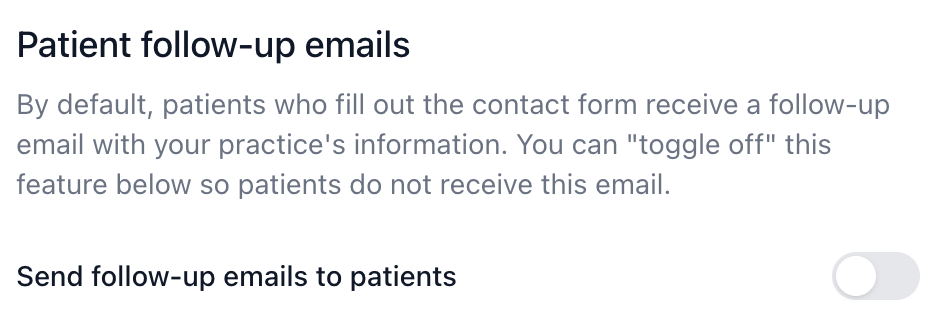
By default, the feature is turned On, meaning patients will continue to receive Bright Referral's automated confirmation email just as they always have.
If you'd rather handle patient communication yourself, simply switch the toggle Off for that specific referral source.
Because this setting is managed individually for each referral source, you can customize the experience based on how referrals are generated. For example, you might leave automated emails enabled for your referring doctors while disabling them for referrals collected at a community event where you have a separate follow-up plan.
Our Recommendation
While we're excited to offer this additional flexibility, we generally recommend keeping automated patient follow-up emails enabled whenever possible.
These emails provide patients with an easy reference back to your practice and help reduce the chance that someone forgets where they were referred or loses the information they need to schedule an appointment. They're a simple but effective way to support patients throughout the referral journey.
However, if your practice already has a well-defined communication strategy or a specialized workflow for certain referral sources, you now have the ability to tailor that experience accordingly.
Technology That Adapts to Your Practice
At Bright Referral, we believe technology should support the way you work; not force you into a single process.
This new feature gives you the flexibility to customize patient communication while still benefiting from the streamlined referral tracking Bright Referral is known for.
Whether you rely on our automated follow-up or prefer to create your own patient journey, the choice is now yours; one referral source at a time.

Comments